This 6-week course provides students with essential skills in modern office productivity software. The program focuses on developing practical abilities in Microsoft Word, Excel, and PowerPoint, along with file management and typing improvement. Students will learn how to create professional documents, organize data using spreadsheets, and design effective presentations. By the end of the course, learners will be able to perform common office tasks confidently for academic, workplace, and personal needs.

Juber Ahmed is an experienced trainer specializing in Office Application Programs, Graphic Design, and WordPress Web Development. With a strong sense of aesthetics and a passion for creating visually appealing designs, he has built a successful career as a professional freelancer. Over the past 10 years, Juber has developed deep expertise across multiple digital skill areas, helping students and clients achieve high-quality, professional results. His clear teaching style and practical approach make learning both easy and effective.

Mujahid Talukder is a skilled trainer with expertise in both Office Application Programs and Graphic Design. He is proficient in MS Word, Excel, PowerPoint, Adobe Photoshop, and Illustrator. Mujahid is known for his simple, practical teaching style, helping students quickly understand and apply digital skills. His training focuses on real-world tasks, enabling learners to create professional documents and creative designs with confidence.
| Section | Details |
|---|---|
| Course Title | Basic Computer Hardware & Office Application |
| Duration | 6 Weeks |
| Course Description | A foundational course covering essential computer hardware knowledge and practical skills in office applications. Students will learn hardware components, simple troubleshooting, and effective use of MS Word, Excel, and PowerPoint. |
| Course Objectives | • Understand basic computer hardware components • Perform simple troubleshooting tasks • Use MS Word, Excel, and PowerPoint efficiently • Prepare documents, spreadsheets, and presentations • Improve typing & file management skills |
| Teaching Methods | • Hands-on lab sessions • Practical tasks & assignments • Instructor-led demonstrations • Final project presentation |
| Assessment | • Class participation • Weekly practical tasks • Final project & presentation |
| Week | Topics Covered |
|---|---|
| Week 1 | Introduction to Computers, Types, and Basic Operations |
| Week 2 | Computer Hardware Components & Functions |
| Week 3 | Troubleshooting Basics and System Maintenance |
| Week 4 | Microsoft Word – Document Creation & Formatting |
| Week 5 | Microsoft Excel – Data Entry, Formulas & Basic Charts |
| Week 6 | Microsoft PowerPoint – Slide Design & Final Project |
This 6-week introductory course is designed to develop students’ creative and technical skills in visual design. The program covers the fundamentals of design principles, color theory, typography, and layout techniques, along with hands-on training in Adobe Photoshop and Illustrator. Students will learn how to create logos, posters, banners, and social media graphics. By completing the course, learners will be able to produce professional-quality designs suitable for personal, academic, and entry-level freelance work.
| Section | Details |
|---|---|
| Course Title | Basic Graphic Design |
| Duration | 6 Weeks |
| Course Description | This course introduces students to the fundamentals of graphic design, covering design principles, color theory, typography, and practical work using Adobe Photoshop and Illustrator. Students will learn to create visually appealing designs for personal, academic, and professional use. |
| Course Objectives | • Understand basic design principles (balance, contrast, alignment, hierarchy) • Learn color theory & typography basics • Develop skills in Adobe Photoshop & Illustrator • Create posters, logos, banners, and social media designs • Build a small design portfolio |
| Teaching Methods | • Practical lab sessions • Visual demonstrations • Weekly creative tasks • Instructor-led tutorials • Final design project |
| Assessment | • Class participation • Weekly design assignments • Final portfolio/project submission |
| Week | Topics Covered |
|---|---|
| Week 1 | Introduction to Graphic Design, Design Principles, Color Theory |
| Week 2 | Typography Basics & Layout Design Fundamentals |
| Week 3 | Adobe Photoshop – Tools, Layers, Photo Editing |
| Week 4 | Photoshop Projects – Posters, Social Media Banners |
| Week 5 | Adobe Illustrator – Logo Design & Vector Graphics |
| Week 6 | Final Portfolio Project – Logo, Poster, Banner Collection |
৳ 10,000
Juber Ahmed || Mujahid Talukder
6 Weeks
36
45
SMART ICT, Moulvibazar
Digital
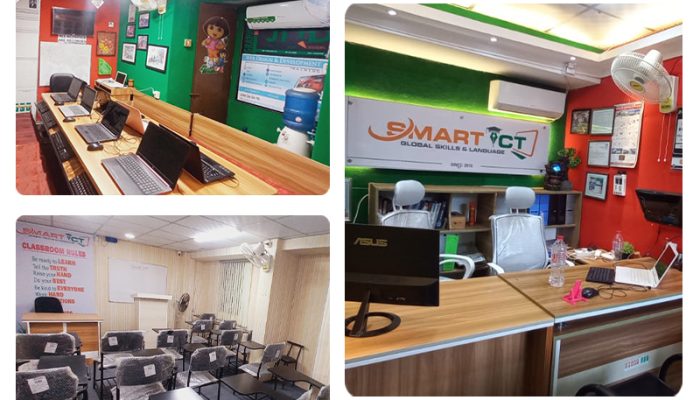
A leading Global Skills and Language Institute In Moulvibazar, its journey in 2015 with a strong focus on professional training, we offer essential digital and language skills.